목차
Undead Survivor
26.04.04
캐릭터 선택 UI
1. 'GameStart'의 자식 오브젝트로 빈 게임 오브젝트를 만들기
: 이름은 'Character Group', PosY와 Width, Height를 수정, 'Grid Layout Group' Component 추가
※ Grid Layout Group
: 자식 오브젝트를 Grid 형태로 정렬하는 Component

2. 'Button Start'를 만든 'Character Group'의 자식으로 이동
: 그리고 이름을 'Character 0'으로 변경
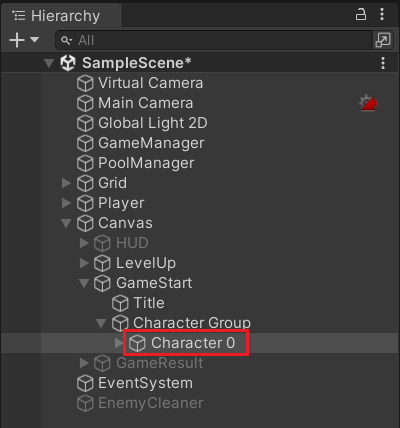
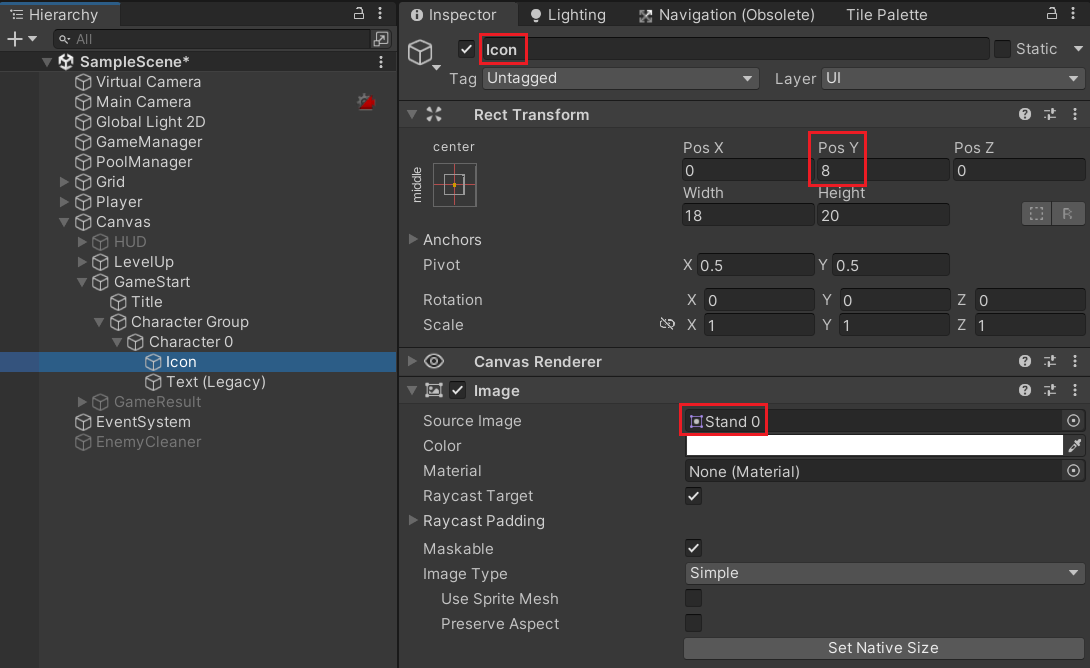
3. 'Character 0'의 자식으로 Image 생성
: 이름 변경, PosY 수정, Image 변경 (Image의 'Stand 0'은 남자 캐릭터)
--> Hierarchy에서 순서를 Text의 위로 이동
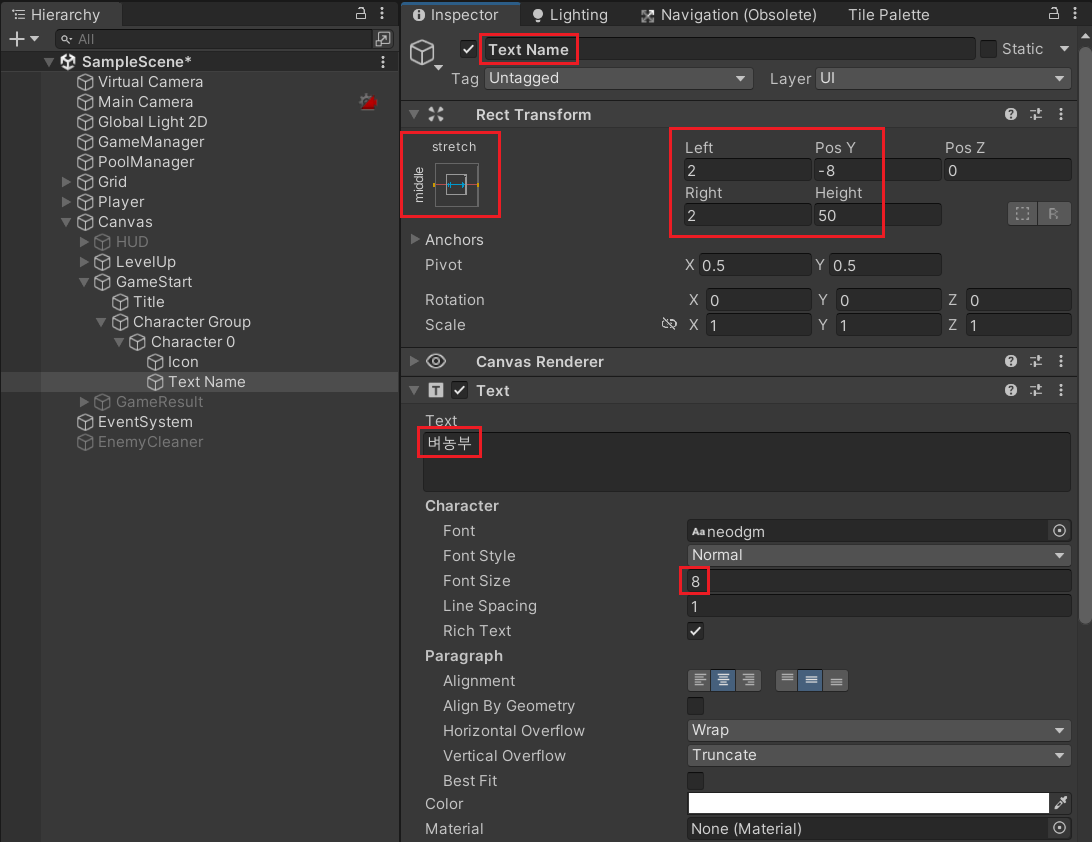
4. Text 수정
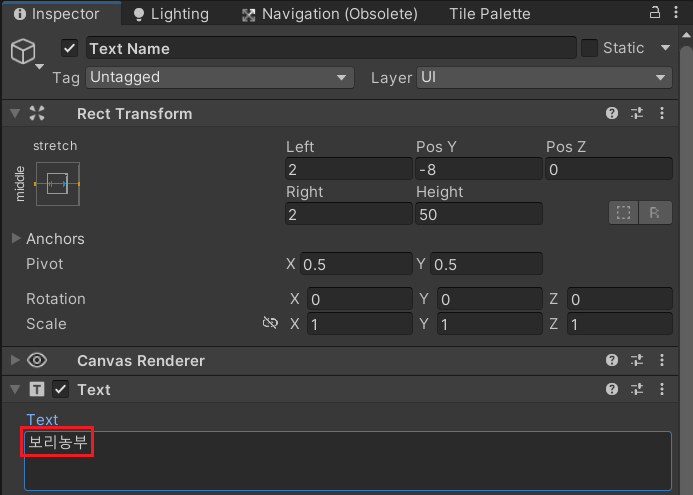
: 이름 변경, Anchor 변경, RectTransform 수정, Text 수정, Font Size 수정
--> Alt + Shift로 pivot과 position 모두 변경
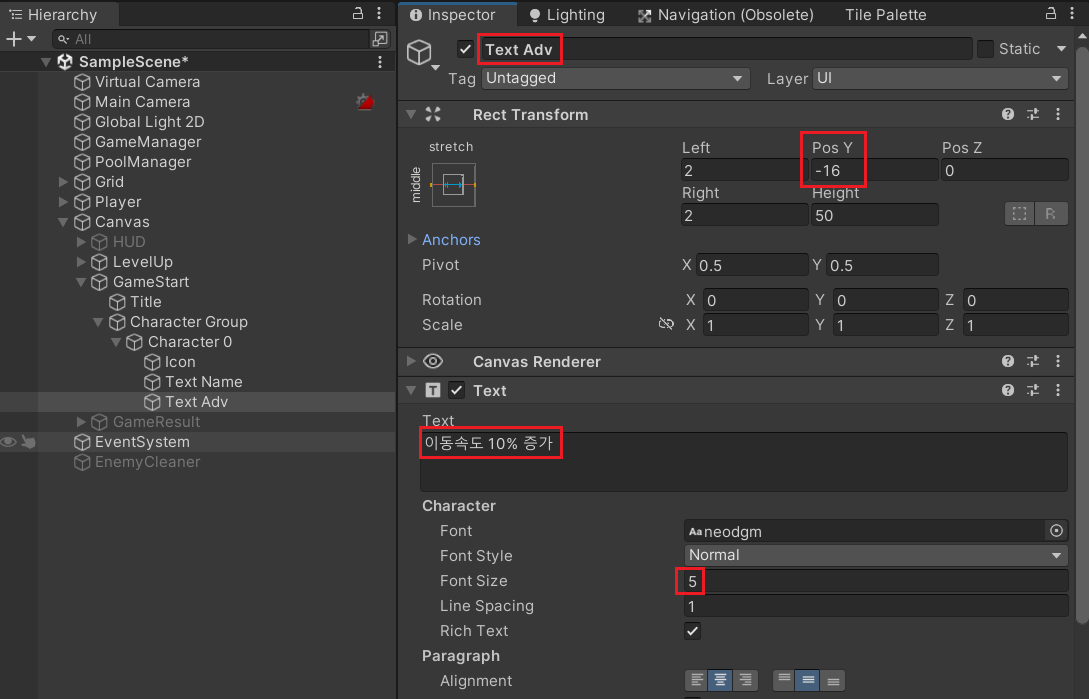
5. Text 추가
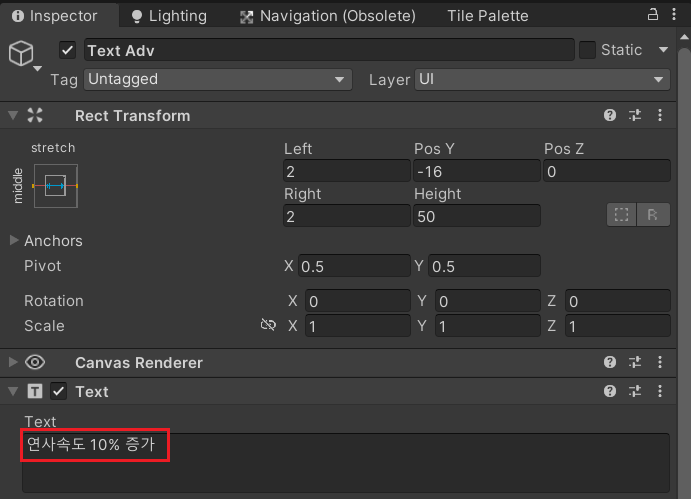
: 기존의 'Text Name'을 복붙하여 이름 변경, PosY 수정, Text 변경, Font Size 수정
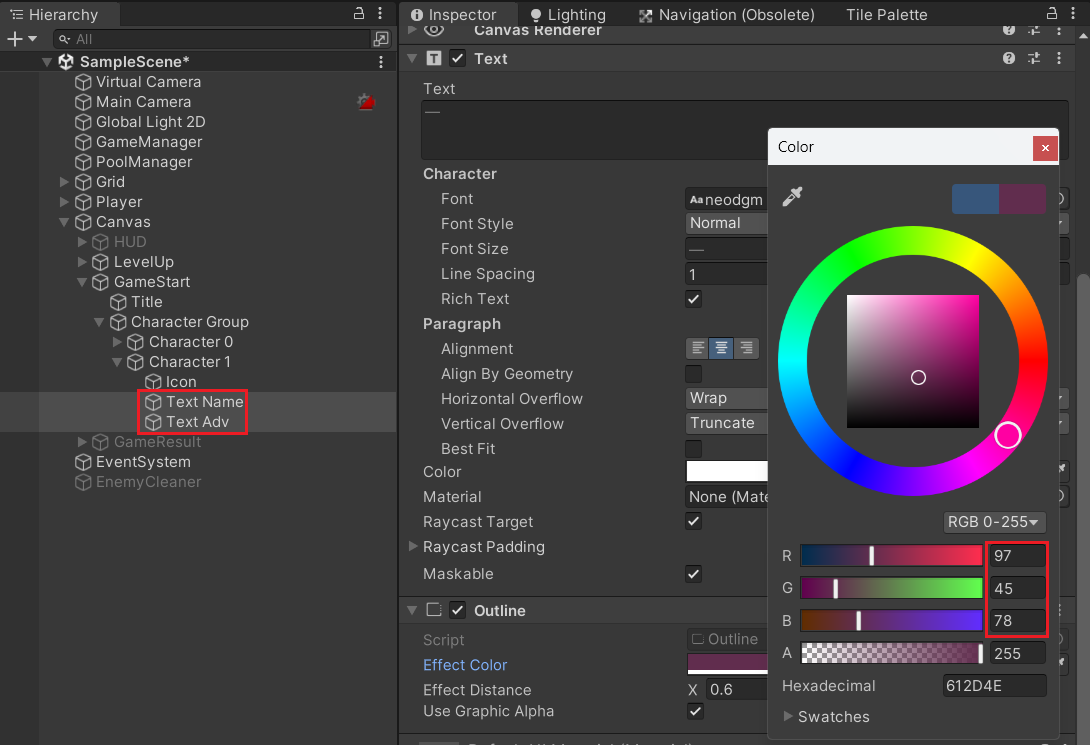
6. 캐릭터의 색상에 맞게 Color 변경
: 'Character 0' 와 Text들의 Outline 색상 변경
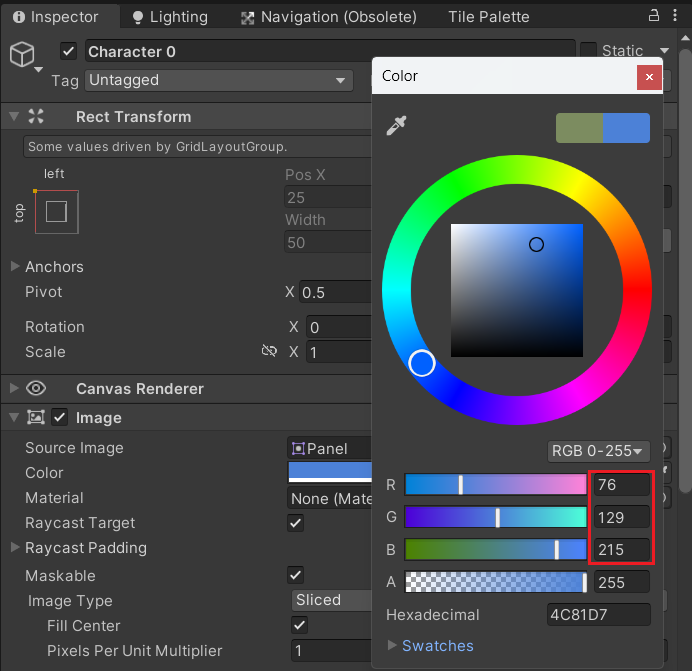
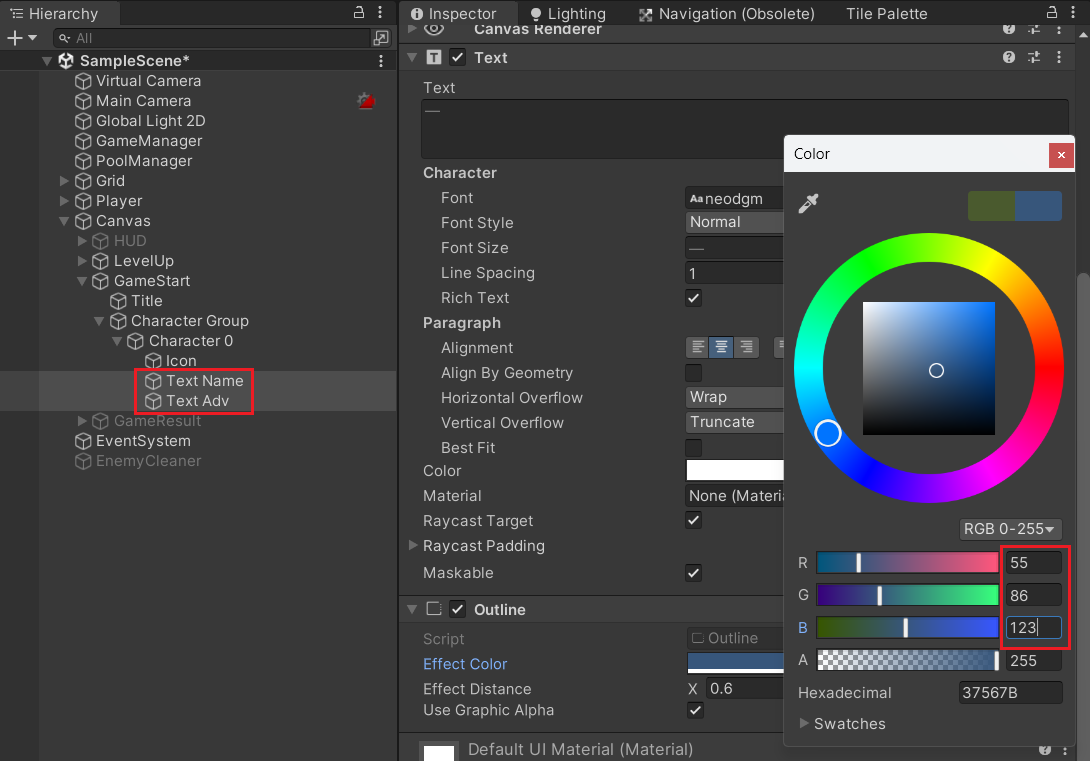
7. 지금까지 만든 'Character 0'을 복붙하여 'Character 1' 만들기
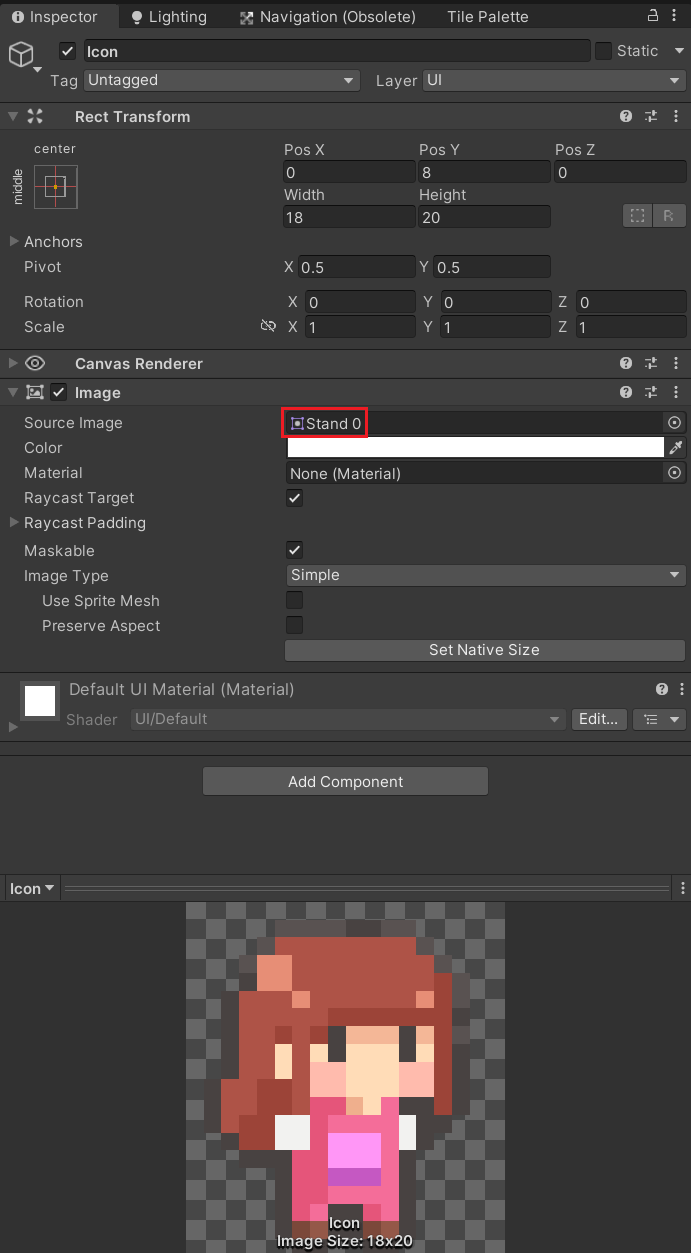
>> Icon
: Image 변경
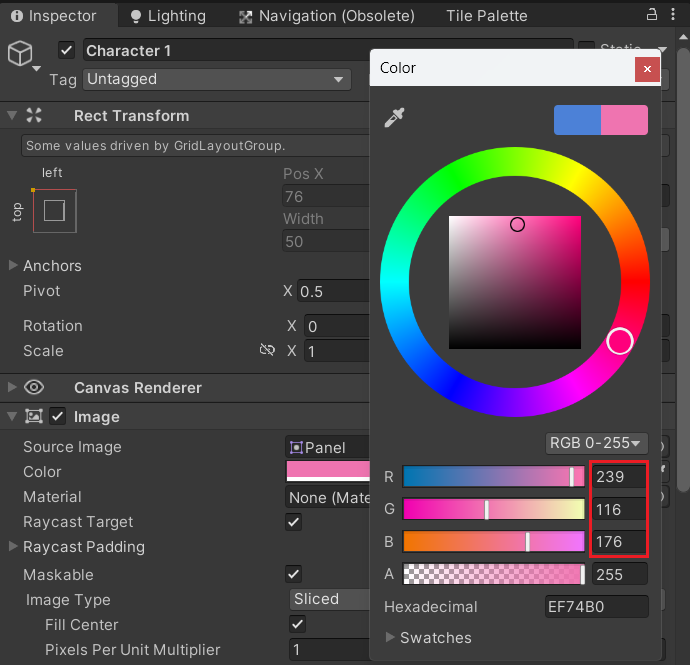
>> Charactor 1
: Color 변경
>> Text
: Color 변경
→ 각각 Text 변경
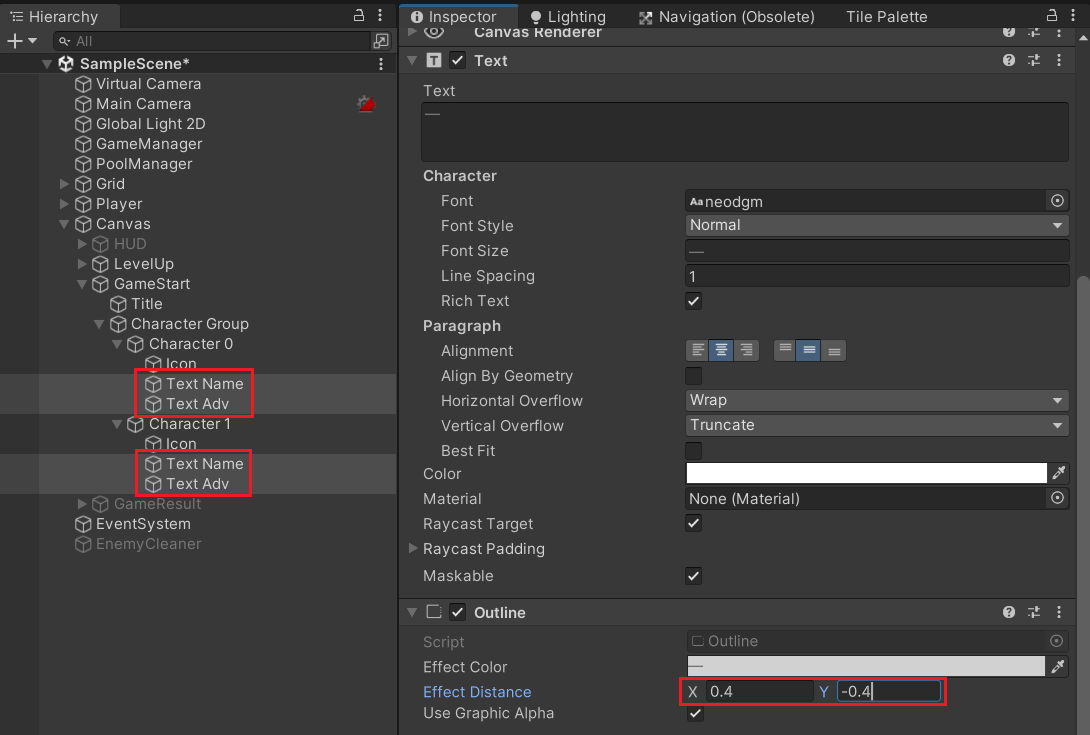
※ Outline
: Effect Distance 변경
선택 적용하기
: 게임 시작 버튼이 2개로 늘어남에 따라 코드에 적용
>> GameManager.cs
: playerId 를 추가하여 게임 시작에 관여
using System;
using System.Collections;
using System.Collections.Generic;
using UnityEngine;
using UnityEngine.SceneManagement;

public class GameManager : MonoBehaviour
{
    public static GameManager instance;
    [Header("# Game Control")]
    public bool isLive;
    public float gameTime;
    public float maxGameTime = 2 * 10f;
    [Header("# Player Info")]
    public int playerId;
    public float health;
    public float maxHealth = 100;
    public int level;
    public int kill;
    public int exp;
    public int[] nextExp = { 3, 5, 10, 100, 150, 210, 280, 360, 450, 600 };
    [Header("# GameObject")]
    public PoolManager pool;
    public Player player;
    public LevelUp uiLevelUp;
    public Result uiResult;
    public GameObject enemyCleaner;

    private void Awake()
    {
        instance = this;
    }

    public void GameStart(int id)
    {
        playerId = id;
        health = maxHealth;
        player.gameObject.SetActive(true);
        uiLevelUp.Select(playerId % 2); // 캐릭터 수가 늘었을 때, 기본 무기가 지급되도록 현재 무기 개수만큼 나머지 연산
        Resume();
    }

    public void GameOver()
    {
        StartCoroutine(GameOverRoutine());
    }

    IEnumerator GameOverRoutine()
    {
        isLive = false;
        yield return new WaitForSeconds(0.5f);  // 게임오버 Animation이 끝날 때까지 기다리기
        uiResult.gameObject.SetActive(true);
        uiResult.Lose();
        Stop();
    }

    public void GameVictory()
    {
        StartCoroutine(GameVictoryRoutine());
    }

    IEnumerator GameVictoryRoutine()
    {
        isLive = false;
        enemyCleaner.SetActive(true);
        yield return new WaitForSeconds(0.5f);  // Enemy의 사망 Animation이 끝날 때까지 기다리기
        uiResult.gameObject.SetActive(true);
        uiResult.Win();
        Stop();
    }

    public void GameRetry()
    {
        SceneManager.LoadScene(0);
    }

    private void Update()
    {
        if (!isLive)
            return;

        gameTime += Time.deltaTime;

        if (gameTime > maxGameTime)
        {
            gameTime = maxGameTime;
            GameVictory();
        }
    }

    public void GetExp()
    {
        if (!isLive) return;

        exp++;

        if (exp == nextExp[Mathf.Min(level, nextExp.Length - 1)])
        {
            level++;
            exp = 0;
            uiLevelUp.Show();
        }
    }

    public void Stop()
    {
        isLive = false;
        Time.timeScale = 0;
    }

    public void Resume()
    {
        isLive = true;
        Time.timeScale = 1;
    }
}
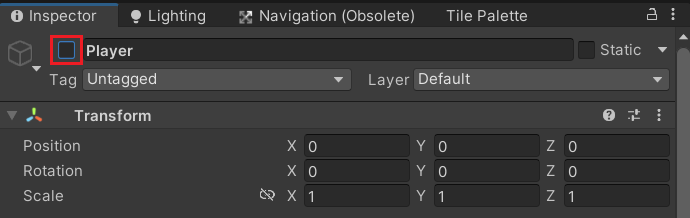
>> 버튼을 클릭했을 때, 그 버튼에 맞는 Character가 Player로 활성화되도록
→ 'Player' 오브젝트 비활성화
→ Animator Controller 만들기
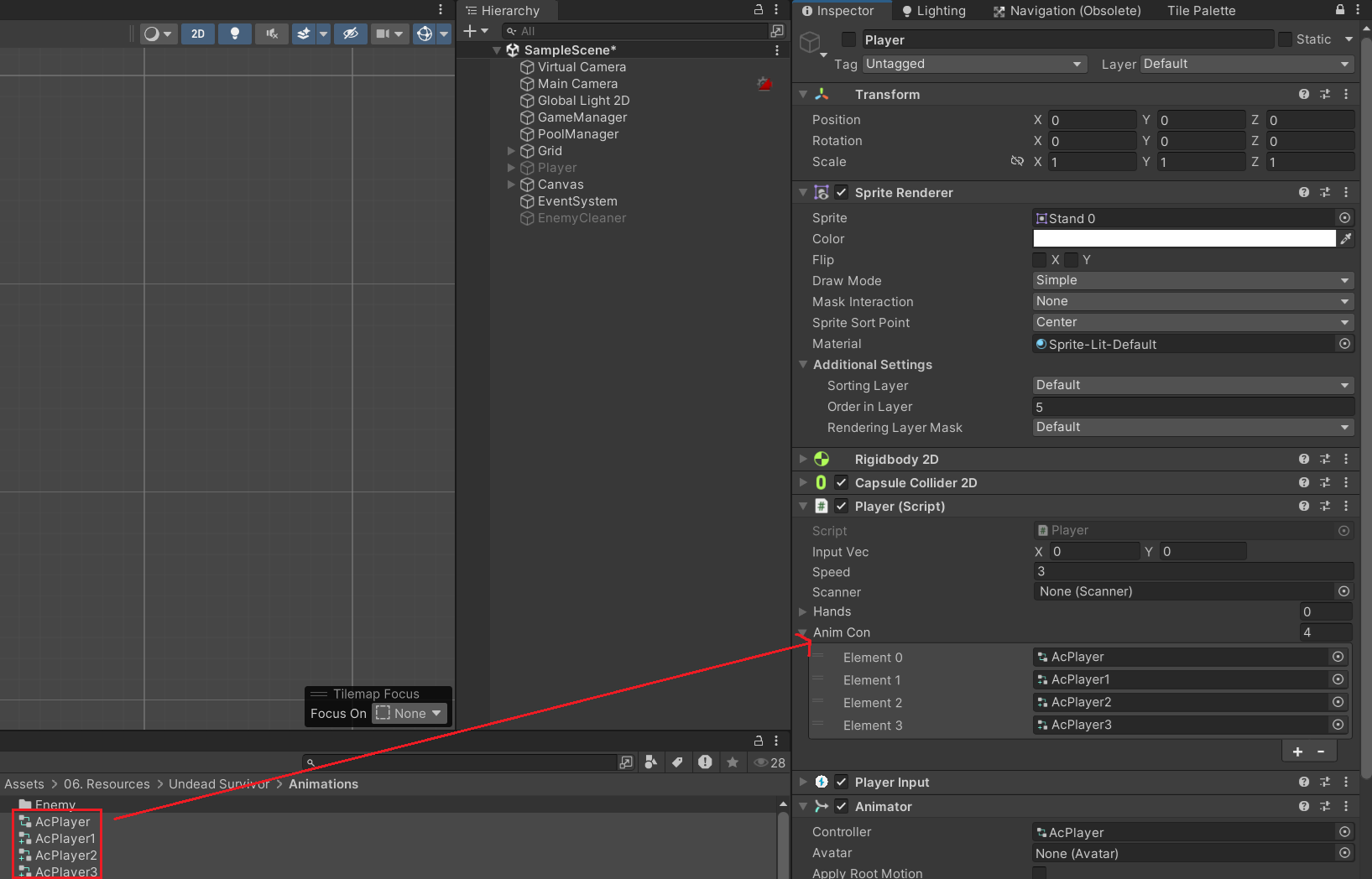
: 'AcPlayer1' 을 만들었듯이, 'Animator Override Controller'를 활용하여 'AcPlayer2'와 'AcPlayer3'을 만들기
※ 아래 링크 참고
2D 셀 애니메이션
목차Undead Survivor26.02.13캐릭터 방향 전환: SpriteRenderer 의 Flip 기능을 활용--> 스크립트를 수정하여 구현 ※ LateUpdate : 프레임이 종료되기 전 실행되는 생명주기 함수 >> Player.csusing System;using System.Coll
mobics.tistory.com
→ Player.cs
: 'Player' 오브젝트가 활성화될 때 'playerId'에 맞는 Animator Controller가 연결되도록
using System;
using System.Collections;
using System.Collections.Generic;
using UnityEngine;
using UnityEngine.InputSystem;

public class Player : MonoBehaviour
{
    public Vector2 inputVec;
    public float speed = 3.0f;
    public Scanner scanner;
    public Hand[] hands;
    public RuntimeAnimatorController[] animCon;

    private Rigidbody2D rigid;
    private SpriteRenderer spriter;
    private Animator anim;

    private void Awake()
    {
        rigid = GetComponent<Rigidbody2D>();
        spriter = GetComponent<SpriteRenderer>();
        anim = GetComponent<Animator>();
        scanner = GetComponent<Scanner>();
        hands = GetComponentsInChildren<Hand>(true);    // true로 인자 값을 넣으면 비활성화 오브젝트도 가져온다.
    }

    private void OnEnable()
    {
        anim.runtimeAnimatorController = animCon[GameManager.instance.playerId];
    }

    private void FixedUpdate()
    {
        if (!GameManager.instance.isLive)
            return;

        Vector2 nextVec = inputVec * speed * Time.fixedDeltaTime;
        rigid.MovePosition(rigid.position + nextVec);
    }


    private void LateUpdate()
    {
        if (!GameManager.instance.isLive)
            return;

        anim.SetFloat("Speed", inputVec.magnitude);

        if (inputVec.x != 0)
        {
            spriter.flipX = inputVec.x < 0;
        }
    }

    private void OnMove(InputValue value)
    {
        inputVec = value.Get<Vector2>();
    }

    private void OnCollisionStay2D(Collision2D other)
    {
        if (!GameManager.instance.isLive) return;

        GameManager.instance.health -= Time.deltaTime * 10;

        if (GameManager.instance.health < 0)
        {
            for (int i = 2; i < transform.childCount; i++)
            {
                transform.GetChild(i).gameObject.SetActive(false);
            }

            anim.SetTrigger("Dead");
            GameManager.instance.GameOver();
        }
    }
}
→ Animator Controller 바인딩
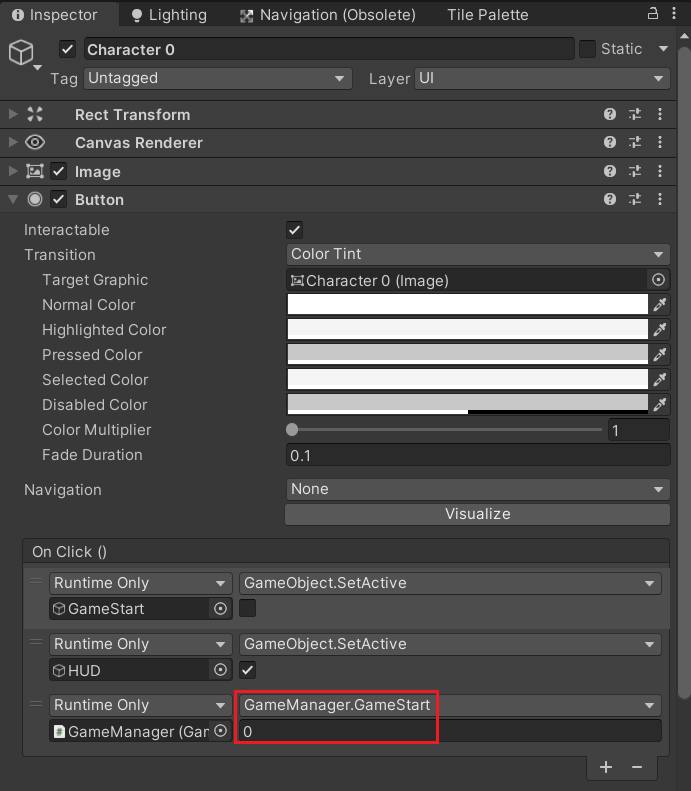
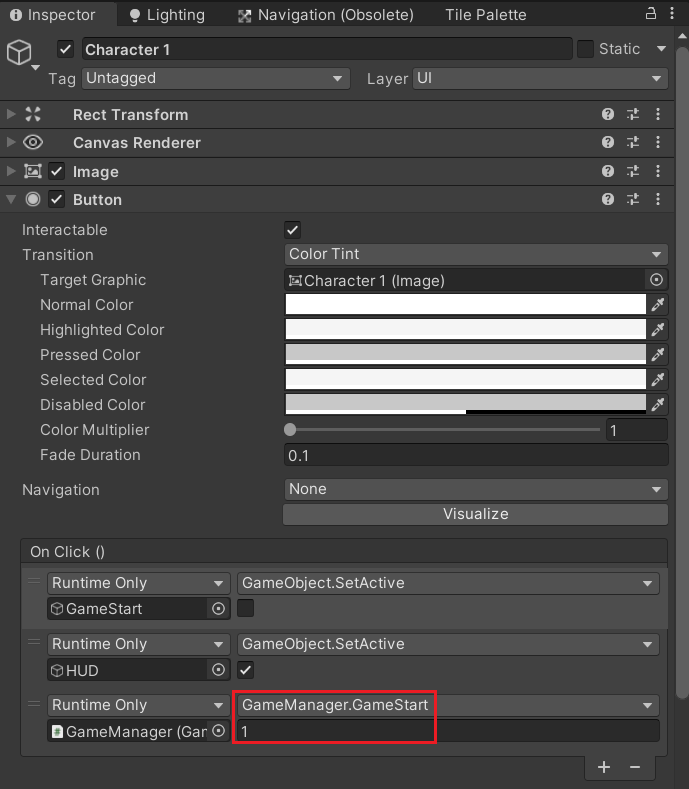
→ Character 버튼의 OnClick() 함수 세팅
: GameStart() 함수가 변경됨에 따라 Character의 index에 맞게 다시 세팅
캐릭터 특성 로직
>> Character.cs 생성
: 캐릭터 특성을 관리하는 Script
--> Class의 속성을 활용
using System.Collections;
using System.Collections.Generic;
using UnityEngine;

public class Character : MonoBehaviour
{
    public static float Speed => GameManager.instance.playerId == 0 ? 1.1f : 1f;
    public static float WeaponSpeed => GameManager.instance.playerId == 1 ? 1.1f : 1f;
    public static float WeaponRate => GameManager.instance.playerId == 1 ? 0.9f : 1f;
    public static float Damage => GameManager.instance.playerId == 2 ? 1.2f : 1f;
    public static int Count => GameManager.instance.playerId == 3 ? 1 : 0;
}
>> Player.cs
: OnEnable()에서 활용
using System;
using System.Collections;
using System.Collections.Generic;
using UnityEngine;
using UnityEngine.InputSystem;

public class Player : MonoBehaviour
{
    public Vector2 inputVec;
    public float speed = 3.0f;
    public Scanner scanner;
    public Hand[] hands;
    public RuntimeAnimatorController[] animCon;

    private Rigidbody2D rigid;
    private SpriteRenderer spriter;
    private Animator anim;

    private void Awake()
    {
        rigid = GetComponent<Rigidbody2D>();
        spriter = GetComponent<SpriteRenderer>();
        anim = GetComponent<Animator>();
        scanner = GetComponent<Scanner>();
        hands = GetComponentsInChildren<Hand>(true);    // true로 인자 값을 넣으면 비활성화 오브젝트도 가져온다.
    }

    private void OnEnable()
    {
        speed *= Character.Speed;
        anim.runtimeAnimatorController = animCon[GameManager.instance.playerId];
    }

    private void FixedUpdate()
    {
        if (!GameManager.instance.isLive)
            return;

        Vector2 nextVec = inputVec * speed * Time.fixedDeltaTime;
        rigid.MovePosition(rigid.position + nextVec);
    }


    private void LateUpdate()
    {
        if (!GameManager.instance.isLive)
            return;

        anim.SetFloat("Speed", inputVec.magnitude);

        if (inputVec.x != 0)
        {
            spriter.flipX = inputVec.x < 0;
        }
    }

    private void OnMove(InputValue value)
    {
        inputVec = value.Get<Vector2>();
    }

    private void OnCollisionStay2D(Collision2D other)
    {
        if (!GameManager.instance.isLive) return;

        GameManager.instance.health -= Time.deltaTime * 10;

        if (GameManager.instance.health < 0)
        {
            for (int i = 2; i < transform.childCount; i++)
            {
                transform.GetChild(i).gameObject.SetActive(false);
            }

            anim.SetTrigger("Dead");
            GameManager.instance.GameOver();
        }
    }
}
>> Gear.cs
: SpeedUp()과 RateUp()에서 활용
using System.Collections;
using System.Collections.Generic;
using UnityEngine;

public class Gear : MonoBehaviour
{
    public ItemData.ItemType type;
    public float rate;

    public void Init(ItemData data)
    {
        // Basic Set
        name = "Gear" + data.itemId;
        transform.parent = GameManager.instance.player.transform;
        transform.localPosition = Vector3.zero;

        // Property Set
        type = data.itemType;
        rate = data.damages[0];
        ApplyGear();
    }

    public void LevelUp(float rate)
    {
        this.rate = rate;
        ApplyGear();
    }

    private void ApplyGear()
    {
        switch (type)
        {
            case ItemData.ItemType.Glove:
                RateUp();
                break;
            case ItemData.ItemType.Shoe:
                SpeedUp();
                break;
        }
    }

    private void RateUp()
    {
        Weapon[] weapons = transform.parent.GetComponentsInChildren<Weapon>();

        foreach (Weapon weapon in weapons)
        {
            switch (weapon.id)
            {
                case 0:
                    float speed = 150 * Character.WeaponSpeed;
                    weapon.speed = speed + (speed * rate);
                    break;
                default:
                    speed = 0.5f * Character.WeaponRate;
                    weapon.speed = speed * (1f - rate);
                    break;
            }
        }
    }

    private void SpeedUp()
    {
        float speed = 3f * Character.Speed;
        GameManager.instance.player.speed = speed + (speed * rate);
    }
}
>> Weapon.cs
: Init()과 LevelUp()에서 활용
using System;
using System.Collections;
using System.Collections.Generic;
using UnityEngine;

public class Weapon : MonoBehaviour
{
    public int id;
    public int prefabId;
    public float damage;
    public int count;
    public float speed;

    private float timer;
    private Player player;

    private void Awake()
    {
        player = GameManager.instance.player;
    }

    private void Update()
    {
        if (!GameManager.instance.isLive)
            return;

        switch (id)
        {
            case 0:
                transform.Rotate(Vector3.back * speed * Time.deltaTime);
                break;
            default:
                timer += Time.deltaTime;

                if (timer > speed)
                {
                    timer = 0f;
                    Fire();
                }
                break;
        }

        // Test Code
        if (Input.GetButtonDown("Jump"))
        {
            LevelUp(10, 1);
        }
    }

    public void LevelUp(float damage, int count)
    {
        this.damage = damage * Character.Damage;
        this.count += count;

        if (id == 0)    // 근접 무기의 경우 속성 변경과 동시에 배치까지
            Position();

        player.BroadcastMessage("ApplyGear", SendMessageOptions.DontRequireReceiver);
    }

    public void Init(ItemData data)
    {
        // Basic Set
        name = "Weapon" + data.itemId;
        transform.parent = player.transform;
        transform.localPosition = Vector3.zero;

        // Property Set
        id = data.itemId;
        damage = data.baseDamage * Character.Damage;
        count = data.baseCount + Character.Count;

        for (int i = 0; i < GameManager.instance.pool.prefabs.Length; i++)
        {
            if (data.projectile == GameManager.instance.pool.prefabs[i])
            {
                prefabId = i;
                break;
            }
        }

        switch (id)
        {
            case 0:
                speed = 150f * Character.WeaponSpeed;
                Position();
                break;
            default:
                speed = 0.4f * Character.WeaponRate;
                break;
        }

        // Hand Set
        Hand hand = player.hands[(int)data.itemType];
        hand.spriter.sprite = data.hand;
        hand.gameObject.SetActive(true);

        player.BroadcastMessage("ApplyGear", SendMessageOptions.DontRequireReceiver);
    }

    private void Position()
    {
        for (int i = 0; i < count; i++)
        {
            Transform bullet;

            if (i < transform.childCount)   // index가 아직 기존 개수보다 작다면 기존의 bullet을 가져오기
            {
                bullet = transform.GetChild(i);
            }
            else   // index가 기존 개수보다 크거나 같다면 새롭게 Pooling하여 bullet을 생성
            {
                bullet = GameManager.instance.pool.Get(prefabId).transform;
                bullet.parent = transform;  // 생성될 bullet의 부모 오브젝트를 'Weapon 0'으로 변경
            }

            // Local Position 및 Local Rotation 초기화
            bullet.localPosition = Vector3.zero;
            bullet.localRotation = Quaternion.identity;

            // 회전
            Vector3 rotVec = Vector3.forward * 360 * i / count;
            bullet.Rotate(rotVec);

            // 위치
            // bullet.up 에서 이미 Local 기준으로 설정되었으므로 Space.World로 작성
            bullet.Translate(bullet.up * 1.5f, Space.World);

            bullet.GetComponent<Bullet>().Init(damage, -1, Vector3.zero); // -1 is Infinity Per
        }
    }

    private void Fire()
    {
        if (!player.scanner.nearestTarget)
            return;

        Vector3 targetPos = player.scanner.nearestTarget.position;
        Vector3 dir = (targetPos - transform.position).normalized;

        Transform bullet = GameManager.instance.pool.Get(prefabId).transform;
        bullet.position = transform.position;
        bullet.rotation = Quaternion.FromToRotation(Vector3.up, dir);
        bullet.GetComponent<Bullet>().Init(damage, count, dir);
    }
}
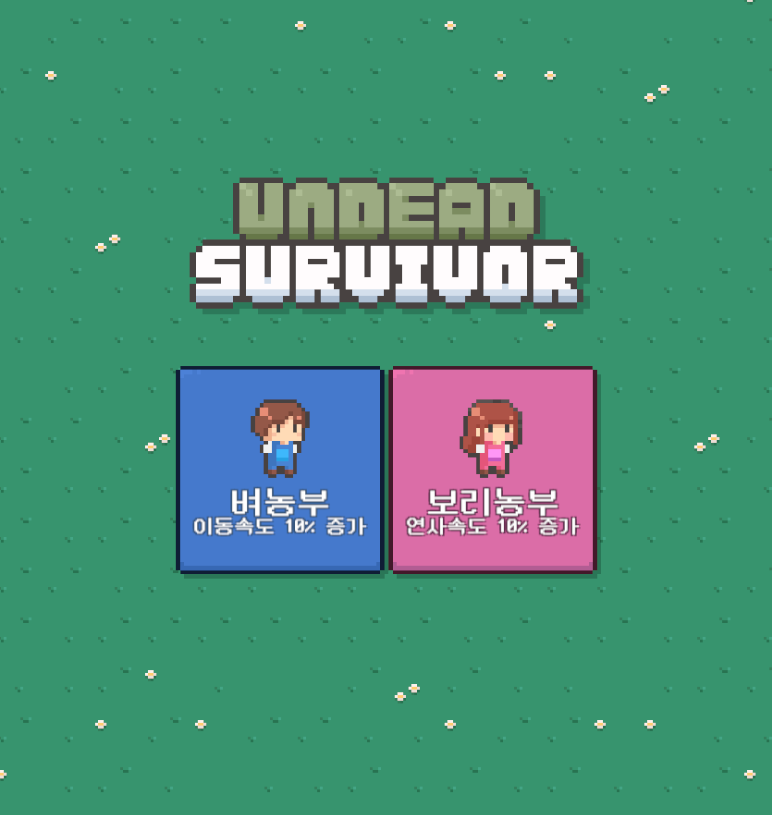
※ 결과
'Development > Undead Survivor' 카테고리의 다른 글
| 게임 시작과 종료 (0) | 2026.04.01 |
|---|---|
| 레벨업 시스템 (0) | 2026.03.27 |
| 무기 장착 표현 (0) | 2026.03.26 |
| 능력 업그레이드 구현 (0) | 2026.03.24 |
| HUD 제작하기 (0) | 2026.03.20 |


